java复习maven
java复习maven
介绍
- Maven 是专门用于构建和管理Java相关项目的工具。
- Maven是意第绪语,依地语(犹太人使用的国际语),表示专家的意思
- 使用Maven管理的Java 项目都有着相同的项目结构
- 有一个pom.xml 用于维护当前项目都用了哪些jar包
- 所有的java代码都放在 src/main/java 下面
- 所有的测试代码都放在src/test/java 下面
- maven风格的项目,首先把所有的jar包都放在”仓库“ 里,然后哪个项目需要用到这个jar包,只需要给出jar包的名称和版本号就行了。 这样jar包就实现了共享
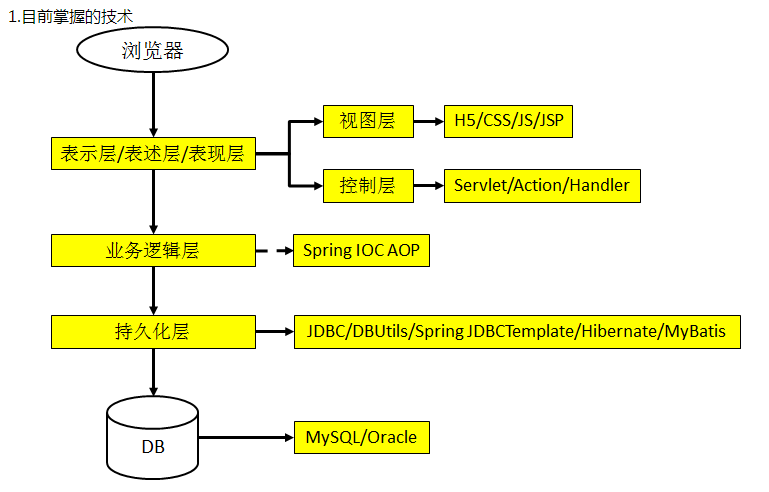
目前技术
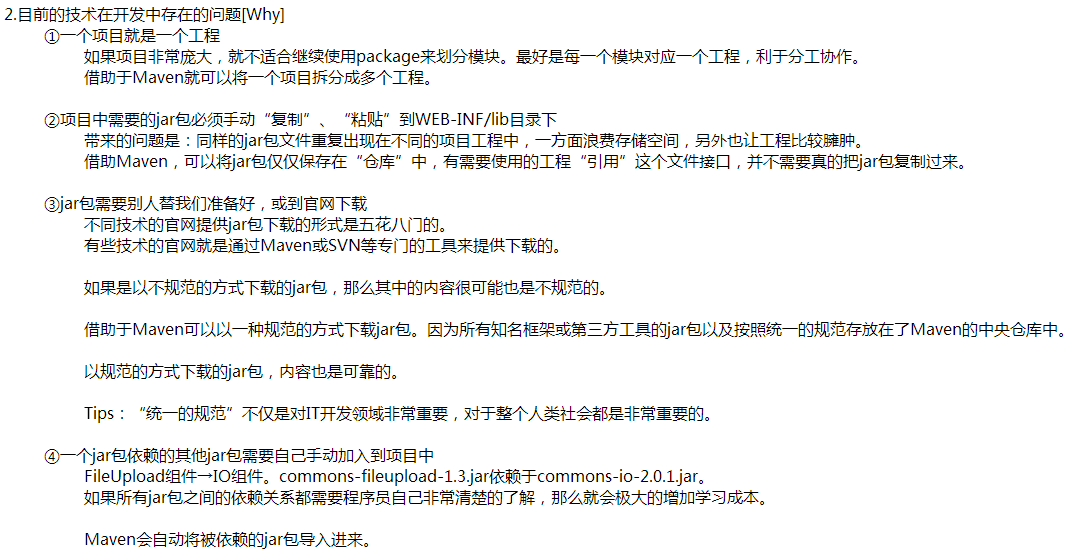
为啥使用
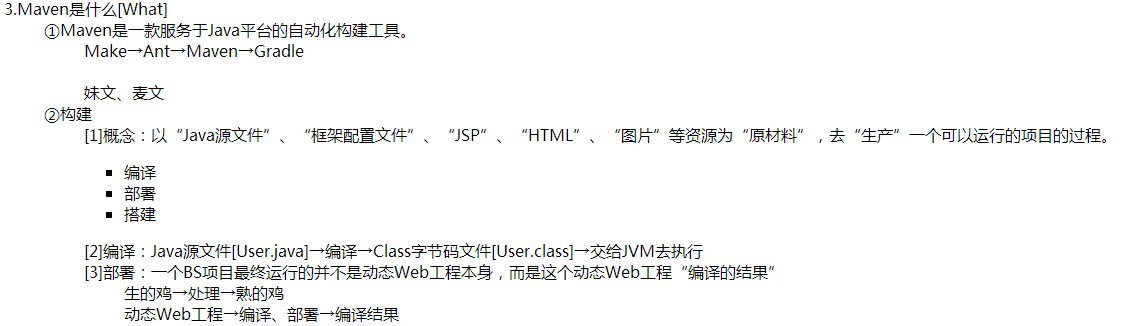
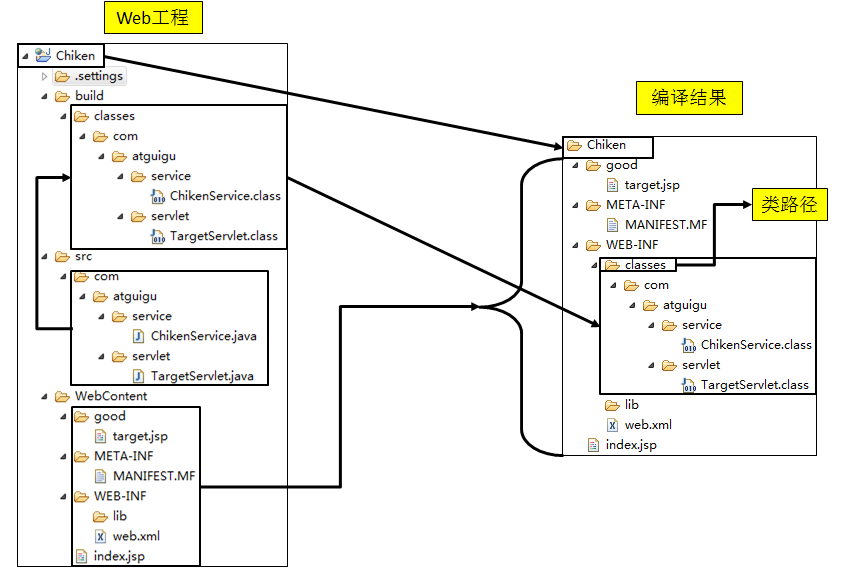
maven简介
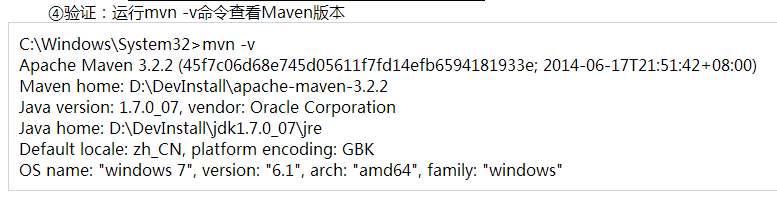
安装
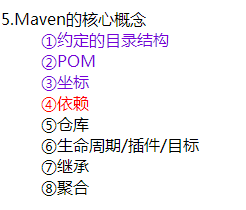
核心概念
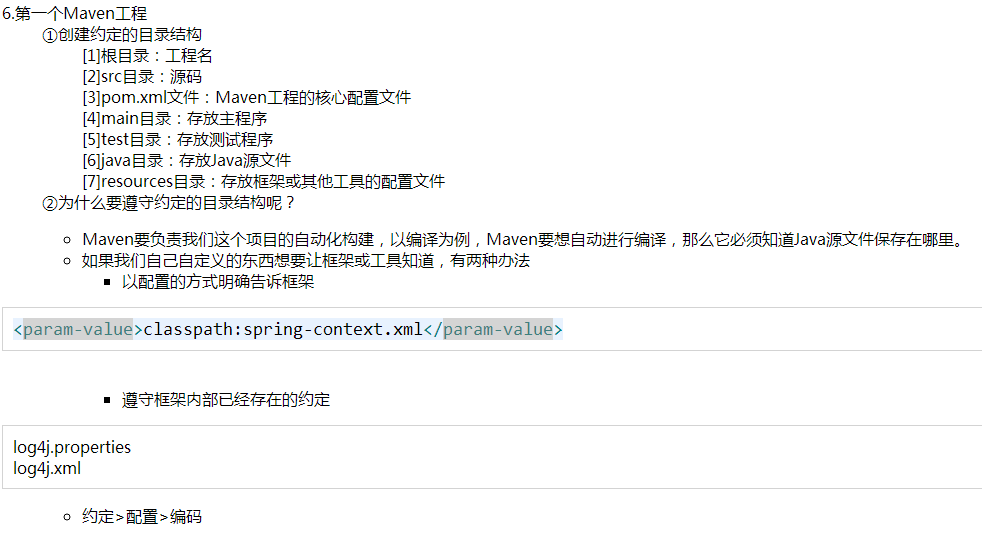
简单工程
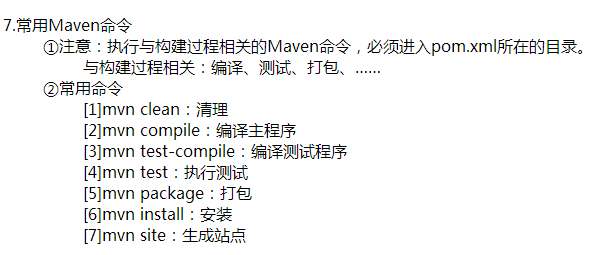
常用命令
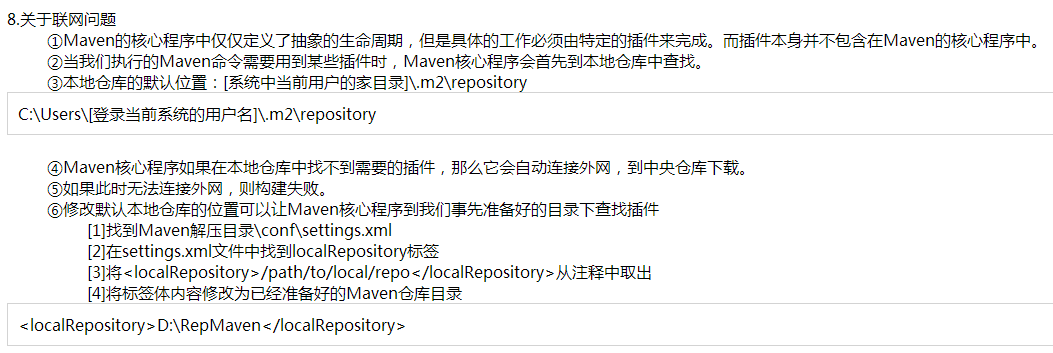
联网下载
POM

节点分布:
1
2
3
4
5
6
7
8
9
10
11
12
13
14
15
16
17
18
19
20
21
22
23
24
25
26
27
28
29
30
31
32
33
34
35
36
37
38
39
40
41
42
43
44
45
<project xmlns="http://maven.apache.org/POM/4.0.0"
         xmlns:xsi="http://www.w3.org/2001/XMLSchema-instance"
         xsi:schemaLocation="http://maven.apache.org/POM/4.0.0
            http://maven.apache.org/xsd/maven-4.0.0.xsd">
    <modelVersion>4.0.0</modelVersion>

    <!-- 基本配置 -->
    <groupId>...</groupId>
    <artifactId>...</artifactId>
    <version>...</version>
    <packaging>...</packaging>


    <!-- 依赖配置 -->
    <dependencies>...</dependencies>
    <parent>...</parent>
    <dependencyManagement>...</dependencyManagement>
    <modules>...</modules>
    <properties>...</properties>

    <!-- 构建配置 -->
    <build>...</build>
    <reporting>...</reporting>

    <!-- 项目信息 -->
    <name>...</name>
    <description>...</description>
    <url>...</url>
    <inceptionYear>...</inceptionYear>
    <licenses>...</licenses>
    <organization>...</organization>
    <developers>...</developers>
    <contributors>...</contributors>

    <!-- 环境设置 -->
    <issueManagement>...</issueManagement>
    <ciManagement>...</ciManagement>
    <mailingLists>...</mailingLists>
    <scm>...</scm>
    <prerequisites>...</prerequisites>
    <repositories>...</repositories>
    <pluginRepositories>...</pluginRepositories>
    <distributionManagement>...</distributionManagement>
    <profiles>...</profiles>
</project>
基本配置信息
1
2
3
4
5
6
7
8
9
10
11
12
13
14
15
16
<project xmlns="http://maven.apache.org/POM/4.0.0"
   xmlns:xsi="http://www.w3.org/2001/XMLSchema-instance"
   xsi:schemaLocation="http://maven.apache.org/POM/4.0.0
   http://maven.apache.org/xsd/maven-4.0.0.xsd">
   <!-- pom模型版本,maven2和3只能为4.0.0-->
   <modelVersion>4.0.0</modelVersion>
   <!-- 项目的组ID,用于maven定位,这在组织或项目中通常是独一无二的-->
   <groupId>com.company.bank</groupId>
   <!-- 项目ID,通常是项目的名称,唯一标识符-->
   <!--除了groupId之外,artifactId还定义了artifact在存储库中的位置-->
   <artifactId>parent</artifactId>
   <!-- 项目的版本-->
   <version>1.0</version>
   <!-- 项目的打包方式,有以下值:pom, jar, maven-plugin, ejb, war, ear, rar, par-->
   <packaging>war</packaging>
<project>
依赖配置
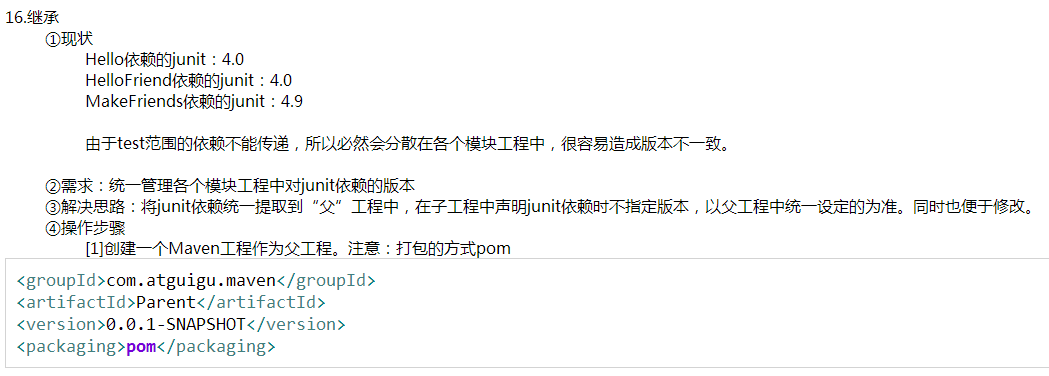
项目相关依赖配置,如果在父项目写的依赖,会被子项目引用。一般会在父项目中定义子项目中所有共用的依赖。
1
2
3
4
5
6
7
<dependencies>
    <dependency>
            <groupId>junit</groupId>
            <artifactId>junit</artifactId>
            <version>4.12</version>
    </dependency>
</dependencies>
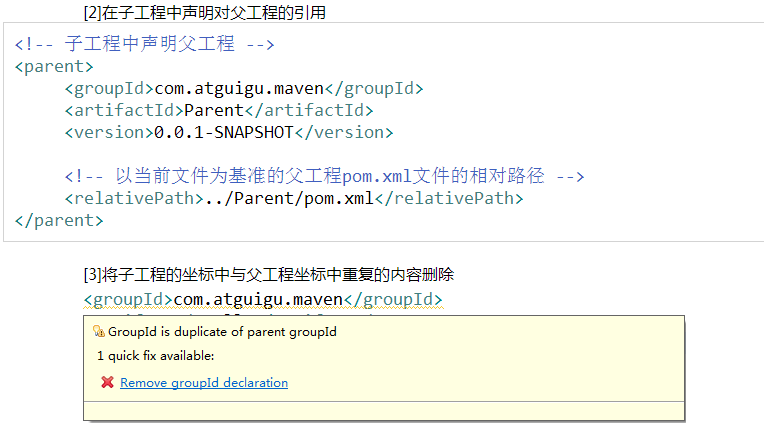
parent用于确定父项目的坐标位置
1
2
3
4
5
6
7
<parent>
    <groupId>com.learnPro</groupId>
    <artifactId>SIP-parent</artifactId>
    <!--Maven首先在当前项目中找父项目的pom,然后在文件系统的这个位置(relativePath),然后在本地仓库,再在远程仓库找。-->
    <relativePath></relativePath>
    <version>0.0.1-SNAPSHOT</version>
</parent>
modules:有些maven项目会做成多模块的,这个标签用于指定当前项目所包含的所有模块。之后对这个项目进行的maven操作,会让所有子模块也进行相同操作。
1
2
3
4
5
<modules>
   <module>com-a</>
   <module>com-b</>
   <module>com-c</>
<modules/>
properties:用于定义pom常量
1
2
3
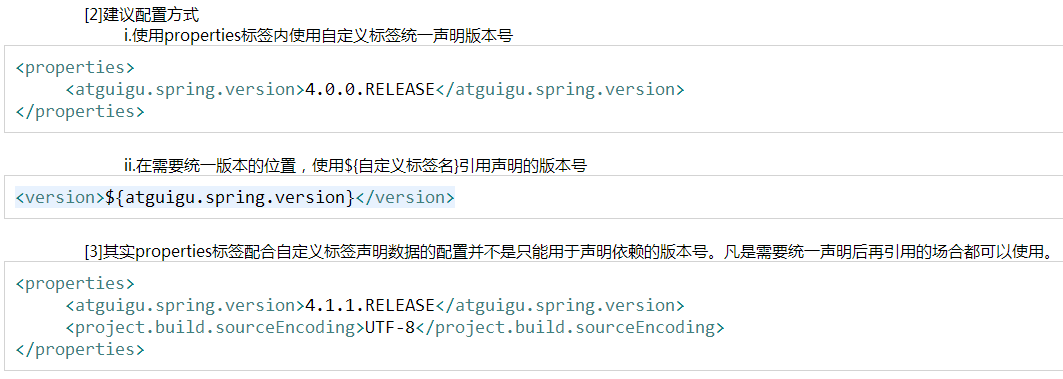
<properties>
    <java.version>1.7</java.version>
</properties>
上面这个常量可以在pom文件的任意地方通过${java.version}来引用
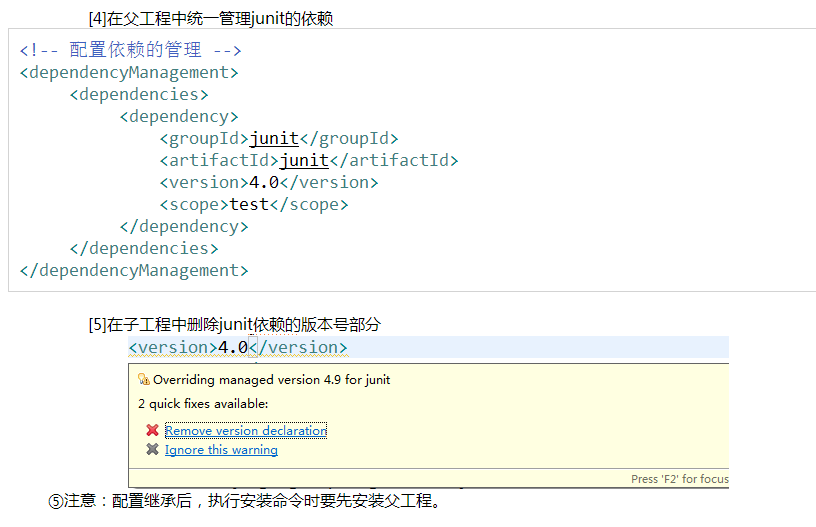
dependencyManagement:配置同dependencies;在父模块中定义后,子模块不会直接使用对应依赖,但是在使用相同依赖的时候可以不加版本号,这样的好处是,父项目统一了版本,而且子项目可以在需要的时候才引用对应的依赖。
1
2
3
4
5
6
7
8
9
10
11
12
13
14
15
16
17
18
<!--父项目:-->
<dependencyManagement>
    <dependencies>
        <dependency>
            <groupId>junit</groupId>
            <artifactId>junit</artifactId>
            <version>4.12</version>
            <scope>test</scope>
        </dependency>
    </dependencies>
</dependencyManagement>

<!--子项目:-->

<dependency>
    <groupId>junit</groupId>
    <artifactId>junit</artifactId>
</dependency>
构建配置
1
2
3
4
5
6
7
8
9
10
11
12
13
14
15
16
17
18
19
20
21
22
23
24
25
26
27
28
29
30
31
32
33
34
35
36
37
38
39
40
41
42
43
44
45
46
47
48
49
50
51
52
53
54
55
56
57
58
59
60
61
62
63
64
65
66
67
68
69
70
71
72
73
74
75
76
77
78
79
80
81
82
83
84
85
86
87
88
89
90
91
92
93
94
95
96
97
98
99
100
101
102
103
104
105
106
107
108
109
110
111
112
113
114
115
116
117
118
<build>
    <!--该元素设置了项目源码目录,当构建项目的时候,构建系统会编译目录里的源码。该路径是相对于pom.xml的相对路径。-->
    <sourceDirectory/>
    <!--该元素设置了项目脚本源码目录,该目录和源码目录不同:绝大多数情况下,该目录下的内容 会被拷贝到输出目录(因为脚本是被解释的,而不是被编译的)。-->
  <scriptSourceDirectory/>
  <!--该元素设置了项目单元测试使用的源码目录,当测试项目的时候,构建系统会编译目录里的源码。该路径是相对于pom.xml的相对路径。-->
  <testSourceDirectory/>
  <!--被编译过的应用程序class文件存放的目录。-->
  <outputDirectory/>
  <!--被编译过的测试class文件存放的目录。-->
  <testOutputDirectory/>
  <!--使用来自该项目的一系列构建扩展-->
  <extensions>
   <!--描述使用到的构建扩展。-->
   <extension>
    <!--构建扩展的groupId-->
    <groupId/>
    <!--构建扩展的artifactId-->
    <artifactId/>
    <!--构建扩展的版本-->
    <version/>
   </extension>
  </extensions>
  <!--当项目没有规定目标(Maven2 叫做阶段)时的默认值-->
  <defaultGoal/>
  <!--这个元素描述了项目相关的所有资源路径列表,例如和项目相关的属性文件,这些资源被包含在最终的打包文件里。-->
  <resources>
   <!--这个元素描述了项目相关或测试相关的所有资源路径-->
   <resource>
    <!-- 描述了资源的目标路径。该路径相对target/classes目录(例如${project.build.outputDirectory})。举个例 子,如果你想资源在特定的包里(org.apache.maven.messages),你就必须该元素设置为org/apache/maven /messages。然而,如果你只是想把资源放到源码目录结构里,就不需要该配置。-->
    <targetPath/>
    <!--是否使用参数值代替参数名。参数值取自properties元素或者文件里配置的属性,文件在filters元素里列出。-->
    <filtering/>
    <!--描述存放资源的目录,该路径相对POM路径-->
    <directory/>
    <!--包含的模式列表,例如**/*.xml.-->
    <includes/>
    <!--排除的模式列表,例如**/*.xml-->
    <excludes/>
   </resource>
  </resources>
  <!--这个元素描述了单元测试相关的所有资源路径,例如和单元测试相关的属性文件。-->
  <testResources>
   <!--这个元素描述了测试相关的所有资源路径,参见build/resources/resource元素的说明-->
   <testResource>
    <targetPath/><filtering/><directory/><includes/><excludes/>
   </testResource>
  </testResources>
  <!--构建产生的所有文件存放的目录-->
  <directory/>
  <!--产生的构件的文件名,默认值是${artifactId}-${version}。-->
  <finalName/>
  <!--当filtering开关打开时,使用到的过滤器属性文件列表-->
  <filters/>
  <!--子项目可以引用的默认插件信息。该插件配置项直到被引用时才会被解析或绑定到生命周期。给定插件的任何本地配置都会覆盖这里的配置-->
  <pluginManagement>
   <!--使用的插件列表 。-->
   <plugins>
    <!--plugin元素包含描述插件所需要的信息。-->
    <plugin>
     <!--插件在仓库里的group ID-->
     <groupId/>
     <!--插件在仓库里的artifact ID-->
     <artifactId/>
     <!--被使用的插件的版本(或版本范围)-->
     <version/>
     <!--是否从该插件下载Maven扩展(例如打包和类型处理器),由于性能原因,只有在真需要下载时,该元素才被设置成enabled。-->
     <extensions/>
     <!--在构建生命周期中执行一组目标的配置。每个目标可能有不同的配置。-->
     <executions>
      <!--execution元素包含了插件执行需要的信息-->
      <execution>
       <!--执行目标的标识符,用于标识构建过程中的目标,或者匹配继承过程中需要合并的执行目标-->
       <id/>
       <!--绑定了目标的构建生命周期阶段,如果省略,目标会被绑定到源数据里配置的默认阶段-->
       <phase/>
       <!--配置的执行目标-->
       <goals/>
       <!--配置是否被传播到子POM-->
       <inherited/>
       <!--作为DOM对象的配置-->
       <configuration/>
      </execution>
     </executions>
     <!--项目引入插件所需要的额外依赖-->
     <dependencies>
      <!--参见dependencies/dependency元素-->
      <dependency>
       ......
      </dependency>
     </dependencies>
     <!--任何配置是否被传播到子项目-->
     <inherited/>
     <!--作为DOM对象的配置-->
     <configuration/>
    </plugin>
   </plugins>
  </pluginManagement>
  <!--使用的插件列表-->
  <plugins>
   <!--参见build/pluginManagement/plugins/plugin元素-->
   <plugin>
    <groupId/><artifactId/><version/><extensions/>
    <executions>
     <execution>
      <id/><phase/><goals/><inherited/><configuration/>
     </execution>
    </executions>
    <dependencies>
     <!--参见dependencies/dependency元素-->
     <dependency>
      ......
     </dependency>
    </dependencies>
    <goals/><inherited/><configuration/>
   </plugin>
  </plugins>
 </build>
reporting:该元素描述使用报表插件产生报表的规范。当用户执行“mvn site”,这些报表就会运行。 在页面导航栏能看到所有报表的链接。
1
2
3
4
5
6
7
8
9
10
11
12
13
14
15
16
17
18
19
20
21
22
23
24
25
26
27
28
29
30
31
32
33
34
35
36
<reporting>
  <!--true,则,网站不包括默认的报表。这包括“项目信息”菜单中的报表。-->
  <excludeDefaults/>
  <!--所有产生的报表存放到哪里。默认值是${project.build.directory}/site。-->
  <outputDirectory/>
  <!--使用的报表插件和他们的配置。-->
  <plugins>
   <!--plugin元素包含描述报表插件需要的信息-->
   <plugin>
    <!--报表插件在仓库里的group ID-->
    <groupId/>
    <!--报表插件在仓库里的artifact ID-->
    <artifactId/>
    <!--被使用的报表插件的版本(或版本范围)-->
    <version/>
    <!--任何配置是否被传播到子项目-->
    <inherited/>
    <!--报表插件的配置-->
    <configuration/>
    <!--一组报表的多重规范,每个规范可能有不同的配置。一个规范(报表集)对应一个执行目标 。例如,有1,2,3,4,5,6,7,8,9个报表。1,2,5构成A报表集,对应一个执行目标。2,5,8构成B报表集,对应另一个执行目标-->
    <reportSets>
     <!--表示报表的一个集合,以及产生该集合的配置-->
     <reportSet>
      <!--报表集合的唯一标识符,POM继承时用到-->
      <id/>
      <!--产生报表集合时,被使用的报表的配置-->
      <configuration/>
      <!--配置是否被继承到子POMs-->
      <inherited/>
      <!--这个集合里使用到哪些报表-->
      <reports/>
     </reportSet>
    </reportSets>
   </plugin>
  </plugins>
 </reporting>
项目名称
1
2
3
4
5
6
7
8
9
10
11
12
13
14
15
16
17
18
19
20
21
22
23
24
25
26
27
28
29
30
31
32
33
34
35
36
37
38
39
<license>
    <!--license用于法律上的名称-->
    <name>...</name>
    <!--官方的license正文页面的URL-->
    <url>....</url>
    <!--项目分发的主要方式:repo,可以从Maven库下载 manual, 用户必须手动下载和安装依赖-->
    <distribution>repo</distribution>
    <!--关于license的补充信息-->
    <comments>....</comments>
</license>

<developers>
    <!--某个开发者信息-->
    <developer>
        <!--开发者的唯一标识符-->
        <id>....</id>
        <!--开发者的全名-->
        <name>...</name>
        <!--开发者的email-->
        <email>...</email>
        <!--开发者的主页-->
        <url>...<url/>
        <!--开发者在项目中的角色-->
        <roles>
            <role>Java Dev</role>
            <role>Web UI</role>
        </roles>
        <!--开发者所属组织-->
        <organization>sun</organization>
        <!--开发者所属组织的URL-->
        <organizationUrl>...</organizationUrl>
        <!--开发者属性,如即时消息如何处理等-->
        <properties>
            <!-- 和主标签中的properties一样,可以随意定义子标签 -->
        </properties>
        <!--开发者所在时区, -11到12范围内的整数。-->
        <timezone>-5</timezone>
    </developer>
</developers>
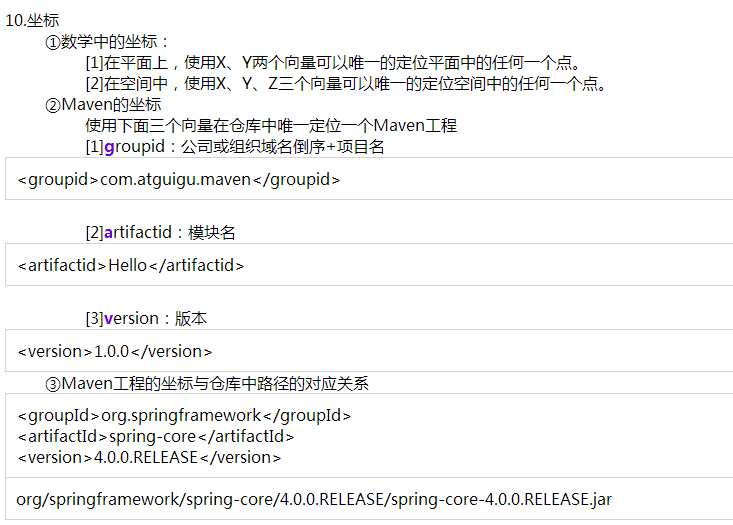
坐标
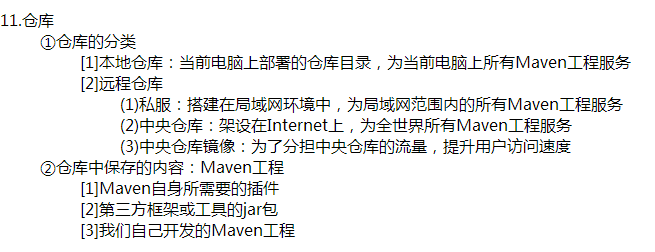
仓库
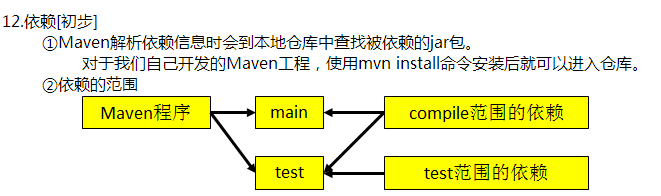
初步依赖
生命周期
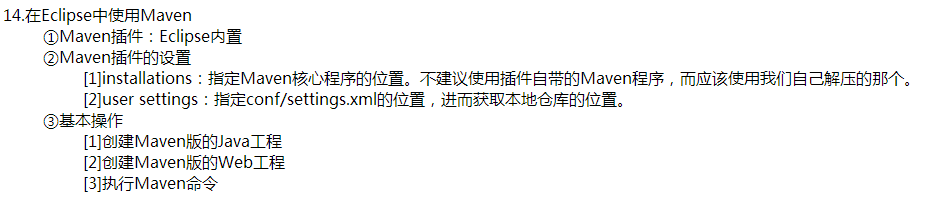
eclipse
高级依赖

继承
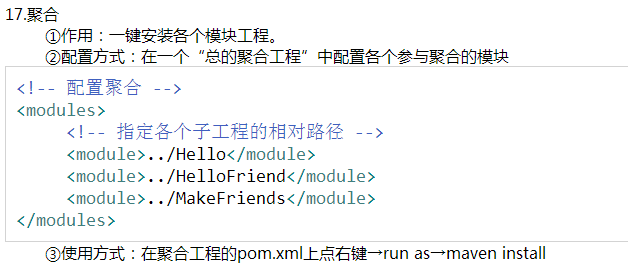
聚合
面试
1
2
3
4
5
6
7
8
9
10
11
12
什么是依赖冲突?处理依赖冲突的手段是什么?

首先来说,对于Maven而言,同一个groupId同一个artifactId下,只能使用一个version!
依赖冲突是由依赖传递引起的版本冲突。比如工程中需要引入A、B,而A依赖1.0版本的C,B依赖2.0版本的C,那么问题来了,C使用的版本将由引入A、B的顺序而定?这显然不靠谱!如果A的依赖写在B的依赖后面,将意味着最后引入的是1.0版本的C,很可能在运行阶段出现类(ClassNotFoundException)、方法(NoSuchMethodError)找不到的错误(因为B使用的是高版本的C)!

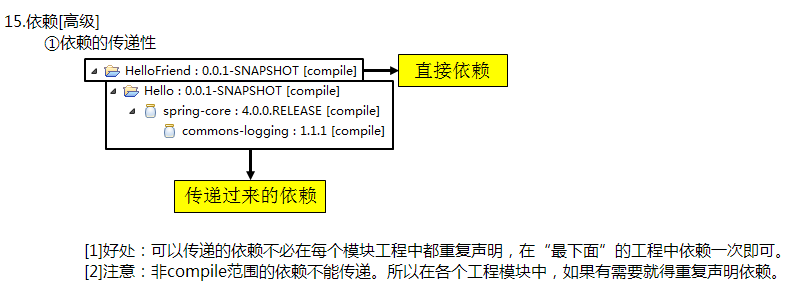
依赖传递:如果A依赖B,B依赖C,那么引入A,意味着B和C都会被引入。
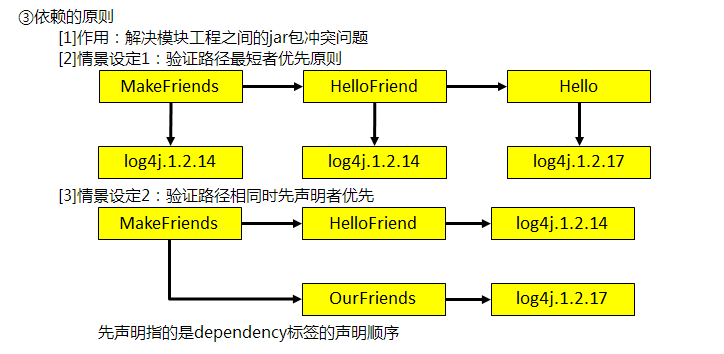
Maven的最近依赖策略:如果一个项目依赖相同的groupId、artifactId的多个版本,那么在依赖树(mvn dependency:tree)中离项目最近的那个版本将会被使用。

方法一:使用IDEA的maven helper插件,选择pom文件下面的dependency analyzer选项,选择冲突选项conflicts。下面列出的就是存在冲突的包。选择一个包,右边会显示被依赖的版本,标注为红色的是当前项目没有用到的依赖,右键选择exclude进行排除就可以解决冲突了

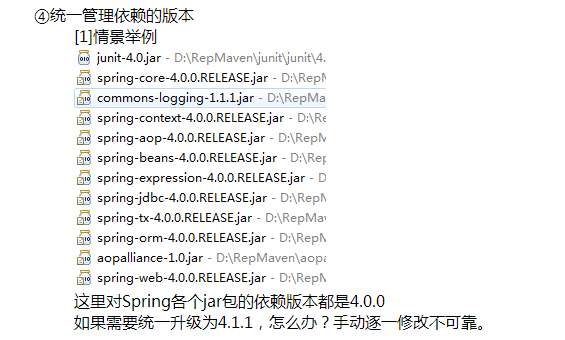
方法二:锁定jar版本(RELEASE):版本锁定后则不考虑依赖的声明顺序或依赖的路径,以锁定的版本的为准添加到工程中,此方法在企业开发中常用。
在工程中锁定依赖的版本并不代表在工程中添加了依赖,如果工程需要添加锁定版本的依赖则需要单独添加标签
1
2
3
4
5
6
7
8
9
10
Maven规范化目录结构?

/pom.xml
/src/main/java
/src/main/resources
/src/test/java
/src/test/resources

src/main下内容最终会打包到Jar/War中,而src/test下是测试内容,并不会打包进去。
src/main/resources中的资源文件会COPY至目标目录,这是Maven的默认生命周期中的一个规定动作。
1
2
3
4
5
6
7
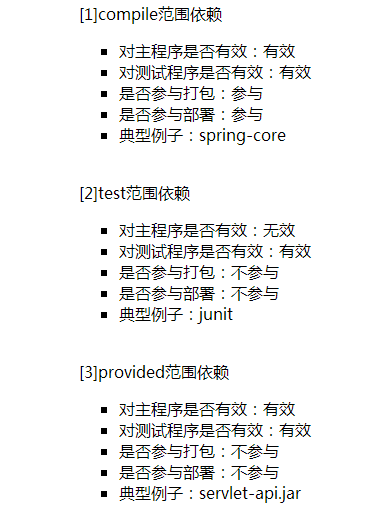
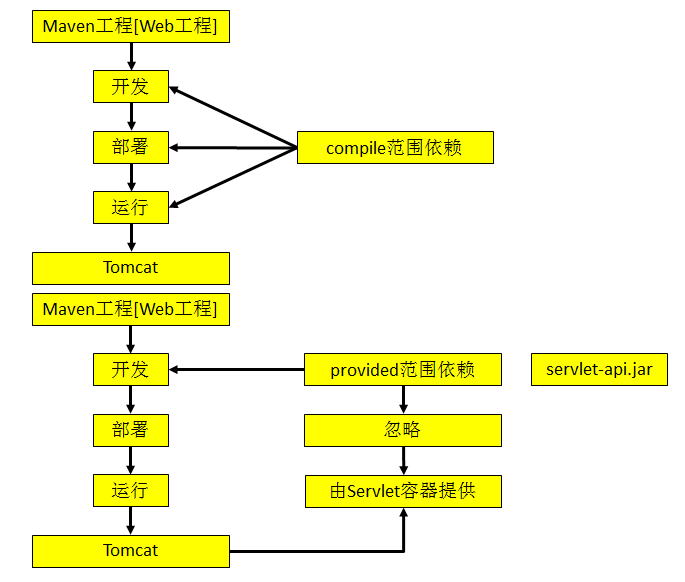
scope依赖范围有哪些?

compile:默认的scope,运行期有效,需要打入包中。
provided:编译期有效,运行期不需要提供,不会打入包中。
runtime:编译不需要,在运行期有效,需要导入包中。(接口与实现分离)
test:测试需要,不会打入包中。
system:非本地仓库引入、存在系统的某个路径下的jar。(一般不使用)
远程仓库配置
setting
1
2
3
4
5
6
7
8
9
10
11
12
13
14
15
16
17
18
19
20
21
22
23
24
25
26
27
28
29
30
31
32
33
34
35
36
37
38
39
40
41
42
43
44
45
46
47
48
49
50
51
52
53
54
55
56
57
58
59
60
61
62
63
64
<?xml version="1.0" encoding="UTF-8"?>
<settings xmlns="http://maven.apache.org/SETTINGS/1.0.0"
          xmlns:xsi="http://www.w3.org/2001/XMLSchema-instance"
          xsi:schemaLocation="http://maven.apache.org/SETTINGS/1.0.0 http://maven.apache.org/xsd/settings-1.0.0.xsd">

  <localRepository>/Users/pingguo/maven/repository</localRepository>
  <pluginGroups>
  </pluginGroups>
  <proxies>
  </proxies>

  <servers>
    <!-- 上传需要的设置: -->
    <server>
        <id>releases</id>
        <username>admin</username>
        <password>admin123</password>
    </server>
    <server>
        <id>snapshots</id>
        <username>admin</username>
        <password>admin123</password>
    </server>
    <server>
        <id>nexus-public</id>
        <username>admin</username>
        <password>admin123</password>
    </server>
  </servers>

  <mirrors>
    <!-- 配置阿里云的镜像 -->
    <mirror>
      <id>nexus-aliyun</id>
      <mirrorOf>central</mirrorOf>
      <name>Nexus aliyun</name>
      <url>http://maven.aliyun.com/nexus/content/groups/public</url>
    </mirror>

    <mirror>
      <id>alimaven</id>
      <mirrorOf>central</mirrorOf>
      <name>aliyun maven</name>
      <url>http://maven.aliyun.com/nexus/content/repositories/central/</url>
    </mirror>

    <mirror>
      <id>tencent</id>
      <name>tencent maven</name>
      <url>http://mirrors.cloud.tencent.com/nexus/repository/maven-public/</url>
      <mirrorOf>central</mirrorOf>
    </mirror>

    <mirror>
        <id>public-snapshots</id>
        <mirrorOf>central</mirrorOf>
        <url>https://maven.wealthyhealthy.cn/nexus/content/groups/public/</url>
    </mirror>
  </mirrors>
  <profiles>
  </profiles>

</settings>
多模块项目中统一维护版本号
在java的多模块项目,也就是父子类项目中统一维护项目的版本号
父项目中利用flatten-maven-plugin插件对子模块中的版本号进行替换
1
2
3
4
5
6
7
8
9
10
11
12
13
14
15
16
17
18
19
20
21
22
23
24
25
26
27
28
29
30
31
32
33
34
35
36
37
38
39
40
41
42
43
44
45
46
47
48
49
50
51
52
53
54
55
56
57
58
59
60
61
62
63
64
65
66
67
68
69
70
71
72
73
74
75
76
77
78
79
80
81
82
83
84
85
86
87
88
89
90
91
92
93
94
95
96
97
98
99
100
101
102
103
104
105
106
107
108
109
110
111
112
113
114
115
116
117
118
119
120
121
122
123
124
125
126
127
128
129
130
131
132
133
134
135
136
137
138
139
140
141
142
143
144
145
146
147
148
149
150
151
152
153
154
155
156
157
158
<?xml version="1.0" encoding="UTF-8"?>
<project xmlns="http://maven.apache.org/POM/4.0.0"
         xmlns:xsi="http://www.w3.org/2001/XMLSchema-instance"
         xsi:schemaLocation="http://maven.apache.org/POM/4.0.0 http://maven.apache.org/xsd/maven-4.0.0.xsd">

    <parent>
        <groupId>org.springframework.boot</groupId>
        <artifactId>spring-boot-starter-parent</artifactId>
        <version>2.1.6.RELEASE</version>
        <relativePath/>
    </parent>

    <modelVersion>4.0.0</modelVersion>
    <groupId>com.fittime.pregnancy.dubbo</groupId>
    <artifactId>fittime-health-dubbo-pregnancy</artifactId>
    <version>${revision}</version>
    <packaging>pom</packaging>

    <modules>
        <module>health-dubbo-pregnancy-service-api</module>
        <module>health-dubbo-pregnancy-service-impl</module>
        <module>health-dubbo-pregnancy-entity</module>
        <module>health-dubbo-pregnancy-common</module>
        <module>health-dubbo-pregnancy-dao</module>
    </modules>

    <!-- 统一版本号管理 -->
    <properties>
        <revision>1.0.2-SNAPSHOT</revision>
    </properties>

    <!-- 引入Jar包管理器 -->
    <dependencyManagement>
        <dependencies>
            <dependency>
                <groupId>com.fittime.boot.dependencies</groupId>
                <artifactId>fittime-boot-dependencies</artifactId>
                <version>1.0.0-SNAPSHOT</version>
                <type>pom</type>
                <scope>import</scope>
            </dependency>
            <dependency>
                <groupId>com.fittime.dubbo.dependencies</groupId>
                <artifactId>fittime-dubbo-dependencies</artifactId>
                <version>1.0.0-SNAPSHOT</version>
                <type>pom</type>
                <scope>import</scope>
            </dependency>
            <dependency>
                <groupId>com.fittime.pregnancy.dubbo</groupId>
                <artifactId>health-dubbo-pregnancy-common</artifactId>
                <version>${revision}</version>
                <scope>compile</scope>
            </dependency>
            <dependency>
                <groupId>com.fittime.pregnancy.dubbo</groupId>
                <artifactId>health-dubbo-pregnancy-dao</artifactId>
                <version>${revision}</version>
                <scope>compile</scope>
            </dependency>
            <dependency>
                <groupId>com.fittime.pregnancy.dubbo</groupId>
                <artifactId>health-dubbo-pregnancy-entity</artifactId>
                <version>${revision}</version>
                <scope>compile</scope>
            </dependency>
            <dependency>
                <groupId>com.fittime.pregnancy.dubbo</groupId>
                <artifactId>health-dubbo-pregnancy-service-api</artifactId>
                <version>${revision}</version>
                <scope>compile</scope>
            </dependency>
        </dependencies>
    </dependencyManagement>

    <!-- nexus start -->
    <repositories>
        <repository>
            <id>rjfittime</id>
            <url>https://maven.wealthyhealthy.cn/nexus/content/groups/public/</url>
            <snapshots>
                <enabled>true</enabled>
                <updatePolicy>always</updatePolicy>
            </snapshots>
            <releases>
                <enabled>true</enabled>
                <updatePolicy>always</updatePolicy>
            </releases>
        </repository>
    </repositories>
    <pluginRepositories>
        <pluginRepository>
            <id>rjfittime</id>
            <url>https://maven.wealthyhealthy.cn/nexus/content/groups/public/</url>
            <snapshots>
                <enabled>true</enabled>
                <updatePolicy>always</updatePolicy>
            </snapshots>
            <releases>
                <enabled>true</enabled>
                <updatePolicy>always</updatePolicy>
            </releases>
        </pluginRepository>
    </pluginRepositories>
    <distributionManagement>
        <snapshotRepository>
            <id>snapshots</id>
            <url>https://maven.wealthyhealthy.cn/nexus/content/repositories/snapshots/</url>
            <uniqueVersion>true</uniqueVersion>
        </snapshotRepository>
        <repository>
            <id>releases</id>
            <url>https://maven.wealthyhealthy.cn/nexus/content/repositories/releases/</url>
            <uniqueVersion>true</uniqueVersion>
        </repository>
    </distributionManagement>
    <!-- nexus end -->

    <!-- 插件管理器 -->
    <build>
        <plugins>
            <!-- 添加flatten-maven-plugin插件 -->
            <plugin>
                <groupId>org.codehaus.mojo</groupId>
                <artifactId>flatten-maven-plugin</artifactId>
                <version>1.3.0</version>
                <inherited>true</inherited>
                <executions>
                    <execution>
                        <id>flatten</id>
                        <phase>process-resources</phase>
                        <goals>
                            <goal>flatten</goal>
                        </goals>
                        <configuration>
                            <!-- 避免IDE将 .flattened-pom.xml 自动识别为功能模块 -->
                            <updatePomFile>true</updatePomFile>
                            <flattenMode>resolveCiFriendliesOnly</flattenMode>
                            <pomElements>
                                <parent>expand</parent>
                                <distributionManagement>remove</distributionManagement>
                                <repositories>remove</repositories>
                            </pomElements>
                        </configuration>
                    </execution>
                    <execution>
                        <id>flatten.clean</id>
                        <phase>clean</phase>
                        <goals>
                            <goal>clean</goal>
                        </goals>
                    </execution>
                </executions>
            </plugin>
        </plugins>
    </build>

</project>
这个插件会生成一个文件,记得在ignore文件中排除一下
1
2
3
修改.gitignore文件,增加一行.flattened-pom.xml;

不可混合使用${revision}和明确字符串版本号,若出现父子模块版本号混合使用${revision}和明确字符串形式如1.0.0.-SNAPSHOT,在mvn package会出现错误
dao子项目,继承父类pom的版本号
1
2
3
4
5
6
7
8
9
10
11
12
13
14
15
16
17
18
19
20
21
22
23
24
25
26
27
28
29
<?xml version="1.0" encoding="UTF-8"?>
<project xmlns="http://maven.apache.org/POM/4.0.0"
         xmlns:xsi="http://www.w3.org/2001/XMLSchema-instance"
         xsi:schemaLocation="http://maven.apache.org/POM/4.0.0 http://maven.apache.org/xsd/maven-4.0.0.xsd">

    <parent>
        <artifactId>fittime-health-dubbo-pregnancy</artifactId>
        <groupId>com.fittime.pregnancy.dubbo</groupId>
        <version>${revision}</version>
        <relativePath>../pom.xml</relativePath>
    </parent>

    <modelVersion>4.0.0</modelVersion>
    <artifactId>health-dubbo-pregnancy-dao</artifactId>
    <packaging>jar</packaging>

    <dependencies>
        <dependency>
            <groupId>com.fittime.pregnancy.dubbo</groupId>
            <artifactId>health-dubbo-pregnancy-common</artifactId>
            <scope>compile</scope>
        </dependency>
        <dependency>
            <groupId>com.fittime.pregnancy.dubbo</groupId>
            <artifactId>health-dubbo-pregnancy-entity</artifactId>
            <scope>compile</scope>
        </dependency>
    </dependencies>
</project>
本文由作者按照 CC BY 4.0 进行授权