java复习JDBC
java复习JDBC
概念
- JDBC (Java DataBase Connection) 是通过JAVA访问数据库
- JDBC是一组规范,通过操作数据库驱动来操作数据库
工具类
1
2
3
4
5
6
7
8
9
10
11
12
13
14
15
16
17
18
19
20
21
22
23
24
25
26
27
package com.zhuoer.qmaintance.utils;

import java.sql.Connection;
import java.sql.DriverManager;
import java.sql.SQLException;

public class DBTools {
	private static final String URL = "jdbc:mysql://127.0.0.1:3306/database?useUnicode=true&characterEncoding=UTF-8";
	private static final String DRIVER = "com.mysql.jdbc.Driver";
	private static final String USER = "root";
	private static final String PASS = "123456";
	private static Connection conn = null;
 	// 建立与数据库的Connection连接
	public static Connection getConnection() {
		try {
			if (conn == null || conn.isClosed()) {
				Class.forName(DRIVER);
				conn = DriverManager.getConnection(URL, USER, PASS);
			}
		} catch (SQLException e) {
			e.printStackTrace();
		} catch (ClassNotFoundException e) {
			e.printStackTrace();
		}
		return conn;
	}
}
1
2
3
4
5
6
7
8
9
10
11
12
13
14
15
16
17
18
19
20
21
22
23
24
25
26
27
28
29
30
31
32
33
34
35
36
37
38
39
40
41
42
43
44
45
46
47
48
49
50
51
52
53
54
55
56
57
58
59
60
61
62
63
64
65
66
67
68
69
70
71
72
73
74
75
76
77
78
79
80
81
82
83
84
85
86
87
88
89
90
91
92
93
94
95
96
97
98
99
100
101
102
103
package com.zhuoer.qmaintance.utils;

import java.sql.PreparedStatement;
import java.sql.ResultSet;
import java.sql.ResultSetMetaData;
import java.sql.SQLException;
import java.util.ArrayList;
import java.util.HashMap;
import java.util.List;
import java.util.Map;

import com.zhuoer.qmaintance.beans.RepairInfo;

public class RepairInfoTools {

	/**
	 * 所有查询工具类
	 * @param sql
	 * @param objects
	 * @return
	 */
	public static List executeQuary(String sql, Object... objects) {
		List li=new ArrayList();
		ResultSet rs;
		try {
			PreparedStatement ps=DBTools.getConnection().prepareStatement(sql);
			if (objects != null) {
				for (int i = 0; i < objects.length; i++) {
					ps.setObject(i + 1, objects[i]);

				}
			}
			rs= ps.executeQuery();

			ResultSetMetaData md = rs.getMetaData();
			int columnCount = md.getColumnCount();
			while (rs.next()) {
				Map rowData = new HashMap();
				for (int i = 1; i <= columnCount; i++)
				{
					rowData.put(md.getColumnName(i), rs.getObject(i));
				}
				li.add(rowData);
			}
			rs.close();
			ps.close();
		} catch (SQLException e) {
			e.printStackTrace();
		}

		return li;
	}
	/**
	 * 查询总页数
	 * @param sql
	 * @return
	 */
	public static int selectCount(String sql) {
		int count=0;
		try {
			PreparedStatement ps = DBTools.getConnection().prepareStatement(sql);
			ResultSet rs = ps.executeQuery();
			if(rs.next())
			{
				count = rs.getInt(1);
			}
			rs.close();
			ps.close();
		} catch (SQLException e) {
			e.printStackTrace();
		}

		return count;
	}

	/**
	 * 修改操作工具类(增删改)
	 * @param sql
	 * @param objects
	 * @return
	 */
	public static int executeUpdate(String sql, Object... objects) {
		int s = -1;
		try {

			PreparedStatement ps=DBTools.getConnection().prepareStatement(sql);
			if (objects != null)
				for (int i = 0; i < objects.length; i++) {

					ps.setObject(i + 1, objects[i]);
				}

			s= ps.executeUpdate();
			ps.close();
			return s;
		} catch (SQLException e) {
			e.printStackTrace();
		}
		return s;
	}


}
增删改
- CRUD是最常见的数据库操作,即增删改查 C 增加(Create) R 读取查询(Retrieve) U 更新(Update) D 删除(Delete)
- 在JDBC中增加,删除,修改的操作都很类似,只是传递不同的SQL语句就行了。
1
2
3
4
5
6
7
8
9
10
11
12
13
14
15
16
17
18
19
20
21
22
23
24
25
26
27
28
29
30
31
32
package jdbc;

import java.sql.Connection;
import java.sql.DriverManager;
import java.sql.SQLException;
import java.sql.Statement;

public class TestJDBC {
    public static void main(String[] args) {

        try {
            Class.forName("com.mysql.jdbc.Driver");
        } catch (ClassNotFoundException e) {
            e.printStackTrace();
        }

        try (
            Connection c = DriverManager.getConnection("jdbc:mysql://127.0.0.1:3306/how2java?characterEncoding=UTF-8",
                "root", "admin");
            Statement s = c.createStatement();
        )
        {
            String sql = "insert into hero values(null," + "'提莫'" + "," + 313.0f + "," + 50 + ")";
            s.execute(sql);

        } catch (SQLException e) {
            // TODO Auto-generated catch block
            e.printStackTrace();
        }
    }
}
1
2
3
4
5
6
7
8
9
10
11
12
13
14
15
16
17
18
19
20
21
22
23
24
25
26
27
28
29
30
31
32
package jdbc;

import java.sql.Connection;
import java.sql.DriverManager;
import java.sql.SQLException;
import java.sql.Statement;

public class TestJDBC {
    public static void main(String[] args) {

        try {
            Class.forName("com.mysql.jdbc.Driver");
        } catch (ClassNotFoundException e) {
            e.printStackTrace();
        }

        try (
            Connection c = DriverManager.getConnection("jdbc:mysql://127.0.0.1:3306/how2java?characterEncoding=UTF-8",
                "root", "admin");
            Statement s = c.createStatement();
        )
        {
            String sql = "delete from hero where id = 5";
            s.execute(sql);

        } catch (SQLException e) {
            // TODO Auto-generated catch block
            e.printStackTrace();
        }
    }
}
1
2
3
4
5
6
7
8
9
10
11
12
13
14
15
16
17
18
19
20
21
22
23
24
25
26
27
28
29
30
31
32
package jdbc;

import java.sql.Connection;
import java.sql.DriverManager;
import java.sql.SQLException;
import java.sql.Statement;

public class TestJDBC {
    public static void main(String[] args) {

        try {
            Class.forName("com.mysql.jdbc.Driver");
        } catch (ClassNotFoundException e) {
            e.printStackTrace();
        }

        try (
            Connection c = DriverManager.getConnection("jdbc:mysql://127.0.0.1:3306/how2java?characterEncoding=UTF-8",
                "root", "admin");
            Statement s = c.createStatement();
        )
        {
            String sql = "update hero set name = 'name 5' where id = 3";
            s.execute(sql);

        } catch (SQLException e) {
            // TODO Auto-generated catch block
            e.printStackTrace();
        }
    }
}
查询
1
2
3
4
5
6
7
8
9
10
11
12
13
14
15
16
17
18
19
20
21
22
23
24
25
26
27
28
29
30
31
32
33
34
35
36
37
38
39
40
package jdbc;

import java.sql.Connection;
import java.sql.DriverManager;
import java.sql.ResultSet;
import java.sql.SQLException;
import java.sql.Statement;

public class TestJDBC {
	public static void main(String[] args) {
		try {
			Class.forName("com.mysql.jdbc.Driver");
		} catch (ClassNotFoundException e) {
			e.printStackTrace();
		}

		try (Connection c = DriverManager.getConnection("jdbc:mysql://127.0.0.1:3306/how2java?characterEncoding=UTF-8",
				"root", "admin"); Statement s = c.createStatement();) {

			String sql = "select * from hero";

			// 执行查询语句,并把结果集返回给ResultSet
			ResultSet rs = s.executeQuery(sql);
			while (rs.next()) {
				int id = rs.getInt("id");// 可以使用字段名
				String name = rs.getString(2);// 也可以使用字段的顺序
				float hp = rs.getFloat("hp");
				int damage = rs.getInt(4);
				System.out.printf("%d\t%s\t%f\t%d%n", id, name, hp, damage);
			}
			// 不一定要在这里关闭ReultSet,因为Statement关闭的时候,会自动关闭ResultSet
			// rs.close();

		} catch (SQLException e) {
			// TODO Auto-generated catch block
			e.printStackTrace();
		}
	}
}
总数
1
2
3
4
5
6
7
8
9
10
11
12
13
14
15
16
17
18
19
20
21
22
23
24
25
26
27
28
29
30
31
32
33
34
35
36
37
package jdbc;

import java.sql.Connection;
import java.sql.DriverManager;
import java.sql.ResultSet;
import java.sql.SQLException;
import java.sql.Statement;

public class TestJDBC {
	public static void main(String[] args) {
		try {
			Class.forName("com.mysql.jdbc.Driver");
		} catch (ClassNotFoundException e) {
			e.printStackTrace();
		}

		try (Connection c = DriverManager.getConnection("jdbc:mysql://127.0.0.1:3306/how2java?characterEncoding=UTF-8",
				"root", "admin"); Statement s = c.createStatement();) {

			String sql = "select count(*) from hero";

			ResultSet rs = s.executeQuery(sql);
			int total = 0;
			while (rs.next()) {
				total = rs.getInt(1);
			}

			System.out.println("表Hero中总共有:" + total+" 条数据");

		} catch (SQLException e) {
			// TODO Auto-generated catch block
			e.printStackTrace();
		}

	}
}
MetaData
1
2
3
4
5
6
7
8
9
10
11
12
13
14
15
16
17
18
19
20
21
22
23
24
25
26
27
28
29
30
31
32
33
34
35
36
37
38
39
40
41
42
43
44
"方法摘要 "
 String getCatalogName(int column)
          "获取指定列的表目录名称。"
 String getColumnClassName(int column)
          "如果调用方法 ResultSet.getObject 从列中获取值,则返回构造其实例的 Java 类的完全限定名称。"
 int getColumnCount()
         " 返回此 ResultSet 对象中的列数。 "
 int getColumnDisplaySize(int column)
         " 指示指定列的最大标准宽度,以字符为单位。"
 String getColumnLabel(int column)
          "获取用于打印输出和显示的指定列的建议标题。 "
 String getColumnName(int column)
          "获取指定列的名称。"
 int getColumnType(int column)
          "获取指定列的 SQL 类型。"
 String getColumnTypeName(int column)
          "获取指定列的数据库特定的类型名称。"
 int getPrecision(int column)
          "获取指定列的指定列宽。 "
 int getScale(int column)
         " 获取指定列的小数点右边的位数。"
 String getSchemaName(int column)
          "获取指定列的表模式。"
 String getTableName(int column)
          "获取指定列的名称。"
 boolean isAutoIncrement(int column)
          "指示是否自动为指定列进行编号。 "
 boolean isCaseSensitive(int column)
         " 指示列的大小写是否有关系。 "
 boolean isCurrency(int column)
         " 指示指定的列是否是一个哈希代码值。 "
 boolean isDefinitelyWritable(int column)
          "指示在指定的列上进行写操作是否明确可以获得成功。"
 int isNullable(int column)
         " 指示指定列中的值是否可以为 null。"
 boolean isReadOnly(int column)
         " 指示指定的列是否明确不可写入。"
 boolean isSearchable(int column)
         " 指示是否可以在 where 子句中使用指定的列。"
 boolean isSigned(int column)
         " 指示指定列中的值是否带正负号。 "
 boolean isWritable(int column)
         " 指示在指定的列上进行写操作是否可以获得成功。"
PropertyUtils
1
2
static void	setProperty(Object bean, String name, Object value)
"设置指定bean的指定属性的值,无论使用哪种属性引用格式,都不进行类型转换。"
Prepared
- 和 Statement一样,PreparedStatement也是用来执行sql语句的
- 与创建Statement不同的是,需要根据sql语句创建PreparedStatement
- 除此之外,还能够通过设置参数,指定相应的值,而不是Statement那样使用字符串拼接
1
2
3
4
5
6
7
8
9
10
11
12
13
14
15
16
17
18
19
20
21
22
23
24
25
26
27
28
29
30
31
32
33
34
35
36
package jdbc;

import java.sql.Connection;
import java.sql.DriverManager;
import java.sql.PreparedStatement;
import java.sql.SQLException;

public class TestJDBC {
    public static void main(String[] args) {
        try {
            Class.forName("com.mysql.jdbc.Driver");
        } catch (ClassNotFoundException e) {
            e.printStackTrace();
        }

        String sql = "insert into hero values(null,?,?,?)";
        try (Connection c = DriverManager.getConnection("jdbc:mysql://127.0.0.1:3306/how2java?characterEncoding=UTF-8","root", "admin");
        	// 根据sql语句创建PreparedStatement
            PreparedStatement ps = c.prepareStatement(sql);
        ) {

            // 设置参数
            ps.setString(1, "提莫");
            ps.setFloat(2, 313.0f);
            ps.setInt(3, 50);
            // 执行
            ps.execute();

        } catch (SQLException e) {
            // TODO Auto-generated catch block
            e.printStackTrace();
        }

    }
}
优点1
- Statement 需要进行字符串拼接,可读性和维护性比较差
String sql = "insert into hero values(null,"+"'提莫'"+","+313.0f+","+50+")";- PreparedStatement 使用参数设置,可读性好,不易犯错
String sql = "insert into hero values(null,?,?,?)";
1
2
3
4
5
6
7
8
9
10
11
12
13
14
15
16
17
18
19
20
21
22
23
24
25
26
27
28
29
30
31
32
33
34
35
36
37
38
39
40
package jdbc;

import java.sql.Connection;
import java.sql.DriverManager;
import java.sql.PreparedStatement;
import java.sql.SQLException;
import java.sql.Statement;

public class TestJDBC {
    public static void main(String[] args) {

        try {
            Class.forName("com.mysql.jdbc.Driver");
        } catch (ClassNotFoundException e) {
            e.printStackTrace();
        }

        String sql = "insert into hero values(null,?,?,?)";
        try (Connection c = DriverManager.getConnection("jdbc:mysql://127.0.0.1:3306/how2java?characterEncoding=UTF-8","root", "admin");
            Statement s = c.createStatement();
            PreparedStatement ps = c.prepareStatement(sql);
        ) {
            // Statement需要进行字符串拼接,可读性和维修性比较差
            String sql0 = "insert into hero values(null," + "'提莫'" + "," + 313.0f + "," + 50 + ")";
            s.execute(sql0);

            // PreparedStatement 使用参数设置,可读性好,不易犯错
            // "insert into hero values(null,?,?,?)";
            ps.setString(1, "提莫");
            ps.setFloat(2, 313.0f);
            ps.setInt(3, 50);
            ps.execute();
        } catch (SQLException e) {
            // TODO Auto-generated catch block
            e.printStackTrace();
        }

    }
}
优点2
- PreparedStatement有预编译机制,性能比Statement更快
优点3
- 防止SQL注入式攻击
1
2
3
4
5
6
7
8
9
10
11
12
13
14
15
16
17
18
19
20
21
22
23
24
25
26
27
28
29
30
31
32
33
34
35
36
37
38
39
40
41
42
43
44
45
46
47
48
49
50
51
52
53
54
55
56
57
58
59
60
61
package jdbc;

import java.sql.Connection;
import java.sql.DriverManager;
import java.sql.PreparedStatement;
import java.sql.ResultSet;
import java.sql.SQLException;
import java.sql.Statement;

public class TestJDBC {
    public static void main(String[] args) {

        try {
            Class.forName("com.mysql.jdbc.Driver");
        } catch (ClassNotFoundException e) {
            e.printStackTrace();
        }

        String sql = "select * from hero where name = ?";
        try (Connection c = DriverManager.getConnection("jdbc:mysql://127.0.0.1:3306/how2java?characterEncoding=UTF-8","root", "admin");
        		Statement s = c.createStatement();
            PreparedStatement ps = c.prepareStatement(sql);
        ) {
            // 假设name是用户提交来的数据
            String name = "'盖伦' OR 1=1";
            String sql0 = "select * from hero where name = " + name;
            // 拼接出来的SQL语句就是
            // select * from hero where name = '盖伦' OR 1=1
            // 因为有OR 1=1,所以恒成立
            // 那么就会把所有的英雄都查出来,而不只是盖伦
            // 如果Hero表里的数据时海量的,比如几百万条,把这个表里的数据全部查出来
            // 会让数据库负载变高,CPU100%,内存消耗光,响应变得极其缓慢
            System.out.println(sql0);

            ResultSet rs0 = s.executeQuery(sql0);
            while (rs0.next()) {
                String heroName = rs0.getString("name");
                System.out.println(heroName);
            }

            s.execute(sql0);

            // 使用预编译Statement就可以杜绝SQL注入

            ps.setString(1, name);

            ResultSet rs = ps.executeQuery();
            // 查不出数据出来
            while (rs.next()) {
                String heroName = rs.getString("name");
                System.out.println(heroName);
            }

		} catch (SQLException e) {
			// TODO Auto-generated catch block
			e.printStackTrace();
		}

    }
}
execute区别
- execute与executeUpdate的相同点:都可以执行增加,删除,修改
1
2
3
4
5
6
7
8
9
10
11
12
13
14
15
16
17
18
19
20
21
22
23
24
25
26
27
28
29
30
31
32
33
34
35
36
37
38
39
package jdbc;

import java.sql.Connection;
import java.sql.DriverManager;
import java.sql.SQLException;
import java.sql.Statement;

public class TestJDBC {
	public static void main(String[] args) {
		try {
			Class.forName("com.mysql.jdbc.Driver");
		} catch (ClassNotFoundException e) {
			e.printStackTrace();
		}

		try (Connection c = DriverManager.getConnection("jdbc:mysql://127.0.0.1:3306/how2java?characterEncoding=UTF-8","root", "admin");
			Statement s = c.createStatement();) {

			String sqlInsert = "insert into Hero values (null,'盖伦',616,100)";
			String sqlDelete = "delete from Hero where id = 100";
			String sqlUpdate = "update Hero set hp = 300 where id = 100";

			// 相同点:都可以执行增加,删除,修改

			s.execute(sqlInsert);
			s.execute(sqlDelete);
			s.execute(sqlUpdate);
			s.executeUpdate(sqlInsert);
			s.executeUpdate(sqlDelete);
			s.executeUpdate(sqlUpdate);

		} catch (SQLException e) {
			// TODO Auto-generated catch block
			e.printStackTrace();
		}

	}
}
- 不同1: execute可以执行查询语句 然后通过getResultSet,把结果集取出来 executeUpdate不能执行查询语句
- 不同2: execute返回boolean类型,true表示执行的是查询语句,false表示执行的是insert,delete,update等等 executeUpdate返回的是int,表示有多少条数据受到了影响
1
2
3
4
5
6
7
8
9
10
11
12
13
14
15
16
17
18
19
20
21
22
23
24
25
26
27
28
29
30
31
32
33
34
35
36
37
38
39
40
41
42
43
44
45
46
47
48
49
50
51
package jdbc;

import java.sql.Connection;
import java.sql.DriverManager;
import java.sql.ResultSet;
import java.sql.SQLException;
import java.sql.Statement;

public class TestJDBC {
    public static void main(String[] args) {

		try {
			Class.forName("com.mysql.jdbc.Driver");
		} catch (ClassNotFoundException e) {
			e.printStackTrace();
		}

		try (Connection c = DriverManager.getConnection("jdbc:mysql://127.0.0.1:3306/how2java?characterEncoding=UTF-8","root", "admin");
			Statement s = c.createStatement();) {

            // 不同1:execute可以执行查询语句
            // 然后通过getResultSet,把结果集取出来
            String sqlSelect = "select * from hero";

            s.execute(sqlSelect);
            ResultSet rs = s.getResultSet();
            while (rs.next()) {
                System.out.println(rs.getInt("id"));
            }

            // executeUpdate不能执行查询语句
            // s.executeUpdate(sqlSelect);

            // 不同2:
            // execute返回boolean类型,true表示执行的是查询语句,false表示执行的是insert,delete,update等等
            boolean isSelect = s.execute(sqlSelect);
            System.out.println(isSelect);

            // executeUpdate返回的是int,表示有多少条数据受到了影响
            String sqlUpdate = "update Hero set hp = 300 where id < 100";
            int number = s.executeUpdate(sqlUpdate);
            System.out.println(number);

		} catch (SQLException e) {
			// TODO Auto-generated catch block
			e.printStackTrace();
		}

    }
}
特殊操作
自增长id
- 在Statement通过execute或者executeUpdate执行完插入语句后,MySQL会为新插入的数据分配一个自增长id,(前提是这个表的id设置为了自增长,在Mysql创建表的时候,AUTO_INCREMENT就表示自增长)
- 但是无论是execute还是executeUpdate都不会返回这个自增长id是多少。需要通过Statement的getGeneratedKeys获取该id
1
2
3
4
5
6
7
8
9
10
11
12
13
14
15
16
17
18
19
20
21
22
23
24
25
26
27
28
29
30
31
32
33
34
35
36
37
38
39
40
41
42
43
44
45
package jdbc;

import java.sql.Connection;
import java.sql.DriverManager;
import java.sql.PreparedStatement;
import java.sql.ResultSet;
import java.sql.SQLException;
import java.sql.Statement;

public class TestJDBC {

    public static void main(String[] args) {
        try {
            Class.forName("com.mysql.jdbc.Driver");
        } catch (ClassNotFoundException e) {
            e.printStackTrace();
        }
         String sql = "insert into hero values(null,?,?,?)";
        try (Connection c = DriverManager.getConnection("jdbc:mysql://127.0.0.1:3306/how2java?characterEncoding=UTF-8","root", "admin");
        		PreparedStatement ps = c.prepareStatement(sql, Statement.RETURN_GENERATED_KEYS);
                ) {

            ps.setString(1, "盖伦");
            ps.setFloat(2, 616);
            ps.setInt(3, 100);

            // 执行插入语句
            ps.execute();

            // 在执行完插入语句后,MySQL会为新插入的数据分配一个自增长id
            // JDBC通过getGeneratedKeys获取该id
            ResultSet rs = ps.getGeneratedKeys();
            if (rs.next()) {
                int id = rs.getInt(1);
                System.out.println(id);
            }

        } catch (SQLException e) {
            // TODO Auto-generated catch block
            e.printStackTrace();
        }

    }
}
元数据获取
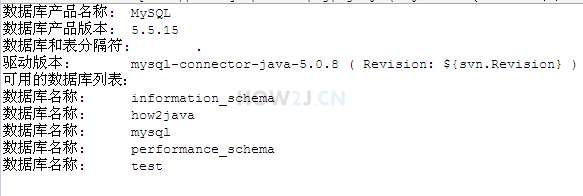
- 元数据概念: 和数据库服务器相关的数据,比如数据库版本,有哪些表,表有哪些字段,字段类型是什么等等。
1
2
3
4
5
6
7
8
9
10
11
12
13
14
15
16
17
18
19
20
21
22
23
24
25
26
27
28
29
30
31
32
33
34
35
36
37
38
39
40
41
42
43
44
45
46
47
48
49
50
package jdbc;

import java.sql.Connection;
import java.sql.DatabaseMetaData;
import java.sql.DriverManager;
import java.sql.ResultSet;
import java.sql.SQLException;
import java.sql.Statement;

public class TestJDBC {

    public static void main(String[] args) throws Exception {
		try {
			Class.forName("com.mysql.jdbc.Driver");
		} catch (ClassNotFoundException e) {
			e.printStackTrace();
		}

		try (Connection c = DriverManager.getConnection("jdbc:mysql://127.0.0.1:3306/how2java?characterEncoding=UTF-8","root", "admin");) {

            // 查看数据库层面的元数据
            // 即数据库服务器版本,驱动版本,都有哪些数据库等等

            DatabaseMetaData dbmd = c.getMetaData();

            // 获取数据库服务器产品名称
            System.out.println("数据库产品名称:\t"+dbmd.getDatabaseProductName());
            // 获取数据库服务器产品版本号
            System.out.println("数据库产品版本:\t"+dbmd.getDatabaseProductVersion());
            // 获取数据库服务器用作类别和表名之间的分隔符 如test.user
            System.out.println("数据库和表分隔符:\t"+dbmd.getCatalogSeparator());
            // 获取驱动版本
            System.out.println("驱动版本:\t"+dbmd.getDriverVersion());

            System.out.println("可用的数据库列表:");
            // 获取数据库名称
            ResultSet rs = dbmd.getCatalogs();

            while (rs.next()) {
                System.out.println("数据库名称:\t"+rs.getString(1));
            }

        } catch (SQLException e) {
            // TODO Auto-generated catch block
            e.printStackTrace();
        }

    }
}
事务
属性
- 原子性:原子性是指事务是一个不可分割的工作单位,事务中的操作要么都发生,要么都不发生。
- 一致性:事务必须使数据库从一个一致性状态变换到另一个一致性状态
- 隔离性:事务的隔离性是指一个事务的执行不能被其他事务干扰,即一个事务内部的操作以及使用的数据对并发的其他事务是隔离的,并发执行的各个事务之间不能互相干扰
- 持久性:持久性是指一个事务一旦被提交,他对数据库中数据的改变是永久性的,接下来的其他操作和数据库故障不应该对其有任何影响
并发问题
- 脏读:对于两个事务T1,T2。T1读取了已经被T2更新但还没有被提交的字段,之后,若T2回滚,T1读取的内容就是临时并且无效的,一定要避免脏读
- 不可重复读:对于两个事务T1,T2。T1读取了一个字段,然后T2更新了这个字段,之后,T1再次读取同一个字段,值就不同了
- 幻读:对于两个事务T1,T2。T1从一个表中读取一个字段,然后T2在该表中插入了一些新的行,之后,如果T1再次读取同一个表,就会多出几行
不使用
- 没有事务的前提下,假设业务操作是:加血,减血各做一次,结束后,英雄的血量不变,而减血的SQL不小心写错写成了 updata(而非update)那么最后结果是血量增加了,而非期望的不变
使用事务
- 在事务中的多个操作,要么都成功,要么都失败
- 通过 c.setAutoCommit(false);关闭自动提交
- 使用 c.commit();进行手动提交
1
2
3
4
5
6
7
8
9
10
11
12
13
14
15
16
17
18
19
20
21
22
23
24
25
26
27
28
29
30
31
32
33
34
35
36
37
38
39
40
41
42
43
44
package jdbc;

import java.sql.Connection;
import java.sql.DriverManager;
import java.sql.SQLException;
import java.sql.Statement;

public class TestJDBC {
    public static void main(String[] args) {
		try {
			Class.forName("com.mysql.jdbc.Driver");
		} catch (ClassNotFoundException e) {
			e.printStackTrace();
		}

		try (Connection c = DriverManager.getConnection("jdbc:mysql://127.0.0.1:3306/how2java?characterEncoding=UTF-8","root", "admin");
			Statement s = c.createStatement();) {

            // 有事务的前提下
            // 在事务中的多个操作,要么都成功,要么都失败

            c.setAutoCommit(false);

            // 加血的SQL
            String sql1 = "update hero set hp = hp +1 where id = 22";
            s.execute(sql1);

            // 减血的SQL
            // 不小心写错写成了 updata(而非update)

            String sql2 = "updata hero set hp = hp -1 where id = 22";
            s.execute(sql2);

            // 手动提交
            c.commit();

		} catch (SQLException e) {
			// TODO Auto-generated catch block
			e.printStackTrace();
		}

    }
}
- 在Mysql中,只有当表的类型是INNODB的时候,才支持事务,所以需要把表的类型设置为INNODB,否则无法观察到事务.
- 修改表的类型为INNODB的SQL:
alter table hero ENGINE = innodb;- 查看表的类型的SQL
show table status from how2java;
ORM
- ORM=Object Relationship Database Mapping
- 对象和关系数据库的映射
- 简单说,一个对象,对应数据库里的一条记录
1
2
3
4
5
6
7
8
9
10
11
12
13
14
15
16
17
18
19
20
21
22
23
24
25
26
27
28
29
30
31
32
33
34
35
36
37
38
39
40
41
42
43
44
45
46
47
48
49
50
51
52
53
54
55
56
57

package jdbc;

import java.sql.Connection;
import java.sql.DriverManager;
import java.sql.ResultSet;
import java.sql.SQLException;
import java.sql.Statement;

import charactor.Hero;

public class TestJDBC {

    public static Hero get(int id) {
        Hero hero = null;
		try {
			Class.forName("com.mysql.jdbc.Driver");
		} catch (ClassNotFoundException e) {
			e.printStackTrace();
		}

		try (Connection c = DriverManager.getConnection("jdbc:mysql://127.0.0.1:3306/how2java?characterEncoding=UTF-8","root", "admin");
			Statement s = c.createStatement();) {

            String sql = "select * from hero where id = " + id;

            ResultSet rs = s.executeQuery(sql);

            // 因为id是唯一的,ResultSet最多只能有一条记录
            // 所以使用if代替while
            if (rs.next()) {
                hero = new Hero();
                String name = rs.getString(2);
                float hp = rs.getFloat("hp");
                int damage = rs.getInt(4);
                hero.name = name;
                hero.hp = hp;
                hero.damage = damage;
                hero.id = id;
            }

		} catch (SQLException e) {
			// TODO Auto-generated catch block
			e.printStackTrace();
		}
        return hero;

    }

    public static void main(String[] args) {

        Hero h = get(22);
        System.out.println(h.name);

    }
}
DAO
- DAO=DataAccess Object
- 数据库访问对象
- 把数据库相关的操作都封装在这个类里面,其他地方看不到JDBC的代码
1
2
3
4
5
6
7
8
9
10
11
12
13
14
15
16
17
18
19
20
21
package jdbc;

import java.util.List;

import charactor.Hero;

public interface DAO{
    //增加
    public void add(Hero hero);
    //修改
    public void update(Hero hero);
    //删除
    public void delete(int id);
    //获取
    public Hero get(int id);
    //查询
    public List<Hero> list();
    //分页查询
    public List<Hero> list(int start, int count);
}
1
2
3
4
5
6
7
8
9
10
11
12
13
14
15
16
17
18
19
20
21
22
23
24
25
26
27
28
29
30
31
32
33
34
35
36
37
38
39
40
41
42
43
44
45
46
47
48
49
50
51
52
53
54
55
56
57
58
59
60
61
62
63
64
65
66
67
68
69
70
71
72
73
74
75
76
77
78
79
80
81
82
83
84
85
86
87
88
89
90
91
92
93
94
95
96
97
98
99
100
101
102
103
104
105
106
107
108
109
110
111
112
113
114
115
116
117
118
119
120
121
122
123
124
125
126
127
128
129
130
131
132
133
134
135
136
137
138
139
140
141
142
143
144
145
146
147
148
149
150
151
152
153
154
155
156
157
158
159
160
161
162
163
164
165
166
167
168
package jdbc;

import java.sql.Connection;

import java.sql.DriverManager;
import java.sql.PreparedStatement;
import java.sql.ResultSet;
import java.sql.SQLException;
import java.sql.Statement;
import java.util.ArrayList;
import java.util.List;

import charactor.Hero;

public class HeroDAO implements DAO{

    public HeroDAO() {
        try {
            Class.forName("com.mysql.jdbc.Driver");
        } catch (ClassNotFoundException e) {
            e.printStackTrace();
        }
    }

    public Connection getConnection() throws SQLException {
        return DriverManager.getConnection("jdbc:mysql://127.0.0.1:3306/how2java?characterEncoding=UTF-8", "root",
                "admin");
    }

    public int getTotal() {
        int total = 0;
        try (Connection c = getConnection(); Statement s = c.createStatement();) {

            String sql = "select count(*) from hero";

            ResultSet rs = s.executeQuery(sql);
            while (rs.next()) {
                total = rs.getInt(1);
            }

            System.out.println("total:" + total);

        } catch (SQLException e) {

            e.printStackTrace();
        }
        return total;
    }

    public void add(Hero hero) {

        String sql = "insert into hero values(null,?,?,?)";
        try (Connection c = getConnection(); PreparedStatement ps = c.prepareStatement(sql);) {

            ps.setString(1, hero.name);
            ps.setFloat(2, hero.hp);
            ps.setInt(3, hero.damage);

            ps.execute();

            ResultSet rs = ps.getGeneratedKeys();
            if (rs.next()) {
                int id = rs.getInt(1);
                hero.id = id;
            }
        } catch (SQLException e) {

            e.printStackTrace();
        }
    }

    public void update(Hero hero) {

        String sql = "update hero set name= ?, hp = ? , damage = ? where id = ?";
        try (Connection c = getConnection(); PreparedStatement ps = c.prepareStatement(sql);) {

            ps.setString(1, hero.name);
            ps.setFloat(2, hero.hp);
            ps.setInt(3, hero.damage);
            ps.setInt(4, hero.id);

            ps.execute();

        } catch (SQLException e) {

            e.printStackTrace();
        }

    }

    public void delete(int id) {

        try (Connection c = getConnection(); Statement s = c.createStatement();) {

            String sql = "delete from hero where id = " + id;

            s.execute(sql);

        } catch (SQLException e) {

            e.printStackTrace();
        }
    }

    public Hero get(int id) {
        Hero hero = null;

        try (Connection c = getConnection(); Statement s = c.createStatement();) {

            String sql = "select * from hero where id = " + id;

            ResultSet rs = s.executeQuery(sql);

            if (rs.next()) {
                hero = new Hero();
                String name = rs.getString(2);
                float hp = rs.getFloat("hp");
                int damage = rs.getInt(4);
                hero.name = name;
                hero.hp = hp;
                hero.damage = damage;
                hero.id = id;
            }

        } catch (SQLException e) {

            e.printStackTrace();
        }
        return hero;
    }

    public List<Hero> list() {
        return list(0, Short.MAX_VALUE);
    }

    public List<Hero> list(int start, int count) {
        List<Hero> heros = new ArrayList<Hero>();

        String sql = "select * from hero order by id desc limit ?,? ";

        try (Connection c = getConnection(); PreparedStatement ps = c.prepareStatement(sql);) {

            ps.setInt(1, start);
            ps.setInt(2, count);

            ResultSet rs = ps.executeQuery();

            while (rs.next()) {
                Hero hero = new Hero();
                int id = rs.getInt(1);
                String name = rs.getString(2);
                float hp = rs.getFloat("hp");
                int damage = rs.getInt(4);
                hero.id = id;
                hero.name = name;
                hero.hp = hp;
                hero.damage = damage;
                heros.add(hero);
            }
        } catch (SQLException e) {

            e.printStackTrace();
        }
        return heros;
    }

}
数据库连接池
传统方式
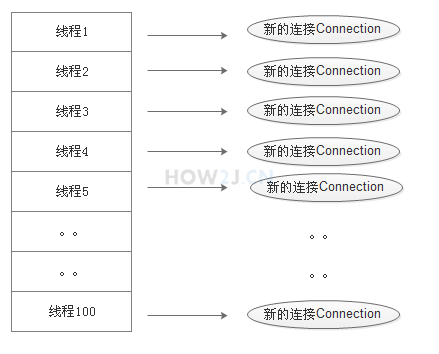
- 当有多个线程,每个线程都需要连接数据库执行SQL语句的话,那么每个线程都会创建一个连接,并且在使用完毕后,关闭连接。
- 创建连接和关闭连接的过程也是比较消耗时间的,当多线程并发的时候,系统就会变得很卡顿。
- 同时,一个数据库同时支持的连接总数也是有限的,如果多线程并发量很大,那么数据库连接的总数就会被消耗光,后续线程发起的数据库连接就会失败。
使用池
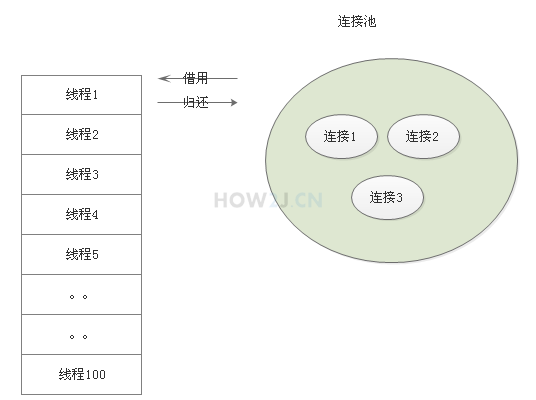
- 与传统方式不同,连接池在使用之前,就会创建好一定数量的连接。
- 如果有任何线程需要使用连接,那么就从连接池里面借用,而不是自己重新创建
- 使用完毕后,又把这个连接归还给连接池供下一次或者其他线程使用
- 倘若发生多线程并发情况,连接池里的连接被借用光了,那么其他线程就会临时等待,直到有连接被归还回来,再继续使用
- 整个过程,这些连接都不会被关闭,而是不断的被循环使用,从而节约了启动和关闭连接的时间
初始化
- ConnectionPool() 构造方法约定了这个连接池一共有多少连接
- 在init() 初始化方法中,创建了size条连接。 注意,这里不能使用try-with-resource这种自动关闭连接的方式,因为连接恰恰需要保持不关闭状态,供后续循环使用
- getConnection, 判断是否为空,如果是空的就wait等待,否则就借用一条连接出去
- returnConnection, 在使用完毕后,归还这个连接到连接池,并且在归还完毕后,调用notifyAll,通知那些等待的线程,有新的连接可以借用了。
1
2
3
4
5
6
7
8
9
10
11
12
13
14
15
16
17
18
19
20
21
22
23
24
25
26
27
28
29
30
31
32
33
34
35
36
37
38
39
40
41
42
43
44
45
46
47
48
49
50
51
52
53
54
55
56
57
58
59
60
package jdbc;

import java.sql.Connection;
import java.sql.DriverManager;
import java.sql.SQLException;
import java.util.ArrayList;
import java.util.List;

public class ConnectionPool {

    List<Connection> cs = new ArrayList<Connection>();

    int size;

    public ConnectionPool(int size) {
        this.size = size;
        init();
    }

    public void init() {

        //这里恰恰不能使用try-with-resource的方式,因为这些连接都需要是"活"的,不要被自动关闭了
        try {
            Class.forName("com.mysql.jdbc.Driver");
            for (int i = 0; i < size; i++) {
                Connection c = DriverManager
                        .getConnection("jdbc:mysql://127.0.0.1:3306/how2java?characterEncoding=UTF-8", "root", "admin");

                cs.add(c);

            }
        } catch (ClassNotFoundException e) {
            // TODO Auto-generated catch block
            e.printStackTrace();
        } catch (SQLException e) {
            // TODO Auto-generated catch block
            e.printStackTrace();
        }
    }

    public synchronized Connection getConnection() {
        while (cs.isEmpty()) {
            try {
                this.wait();
            } catch (InterruptedException e) {
                // TODO Auto-generated catch block
                e.printStackTrace();
            }
        }
        Connection c = cs.remove(0);
        return c;
    }

    public synchronized void returnConnection(Connection c) {
        cs.add(c);
        this.notifyAll();
    }

}
测试
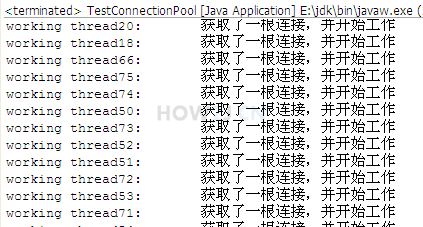
- 首先初始化一个有3条连接的数据库连接池
- 然后创建100个线程,每个线程都会从连接池中借用连接,并且在借用之后,归还连接。 拿到连接之后,执行一个耗时1秒的SQL语句。
1
2
3
4
5
6
7
8
9
10
11
12
13
14
15
16
17
18
19
20
21
22
23
24
25
26
27
28
29
30
31
32
33
34
35
36
37
38
39
40
41
42
43
44
package jdbc;

import java.sql.Connection;
import java.sql.SQLException;
import java.sql.Statement;

import jdbc.ConnectionPool;

public class TestConnectionPool {

    public static void main(String[] args) {
        ConnectionPool cp = new ConnectionPool(3);
        for (int i = 0; i < 100; i++) {
            new WorkingThread("working thread" + i, cp).start();
        }

    }
}

class WorkingThread extends Thread {
    private ConnectionPool cp;

    public WorkingThread(String name, ConnectionPool cp) {
        super(name);
        this.cp = cp;
    }

    public void run() {
        Connection c = cp.getConnection();
        System.out.println(this.getName()+ ":\t 获取了一根连接,并开始工作"  );
        try (Statement st = c.createStatement()){

            //模拟时耗1秒的数据库SQL语句
            Thread.sleep(1000);
            st.execute("select * from hero");

        } catch (SQLException | InterruptedException e) {
            // TODO Auto-generated catch block
            e.printStackTrace();
        }
        cp.returnConnection(c);
    }
}
本文章参考自:http://how2j.cn
本文由作者按照 CC BY 4.0 进行授权